
Gaming Admin Panel

SPORTS • LIVE • ENTERTAINMENT

Gaming Admin Panel for Sports Betting

A centralized management system designed to help authorized operators manage users, sports information, platform settings and administrative activities from one dashboard.

Whether your platform covers cricket, football, tennis, basketball or other sports, a well-structured admin panel helps organize operations, monitor platform activity and manage administrative roles efficiently.

Everything You Want to Explore, Organised in One Place

RADHE brings multiple categories together through a simple and intuitive interface. Instead of moving between different experiences, users can navigate through sports, live events, entertainment and their personal account from one central platform.Whether you're checking upcoming sporting events, exploring what's currently live or reviewing your account activity, every section is designed to keep the information you need within easy reach.

SPORTS

Explore popular sports and quickly create Master IDs with required account details for smooth, efficient account management and access.

LIVE

Discover events currently taking place and access available live-event information through a dedicated live section.

ENTERTAINMENT

Explore available live casino, table games and digital entertainment options for an immersive gaming experience today with exciting choices and fun.

MY ACCOUNT

Manage your profile, security settings, activity and available account controls from one place with ease, flexibility and complete control.

Multi-Sport Gaming Admin Panel for Different Sports

A multi-sport Gaming Admin Panel can bring different sports categories and their associated event information into one management system. Each sport has its own schedules, match formats and data requirements, so the platform should support sport-specific configuration.

Cricket Gaming Panel

Organize Test, ODI, T20, domestic tournaments and league-related match information, subject to the available sports data integration.

Tennis Gaming Panel

Organize tournament schedules, player information and supported match data for tennis events.

Kabaddi Gaming Panel

Organize kabaddi leagues, team details, match schedules and available sports information.

Football Gaming Panel

Manage football fixtures, leagues, match schedules and supported event information for domestic and international competitions

Basketball Gaming Panel

Manage basketball competitions, fixtures, team information and relevant event data.

Other Sports

Additional categories may include badminton, volleyball, hockey, table tennis and other supported sports.

Key Features of a Sports Gaming Admin Pane

A comprehensive admin panel brings together the tools needed to oversee platform operations, manage access and review important activity.

Centralized Admin Dashboard

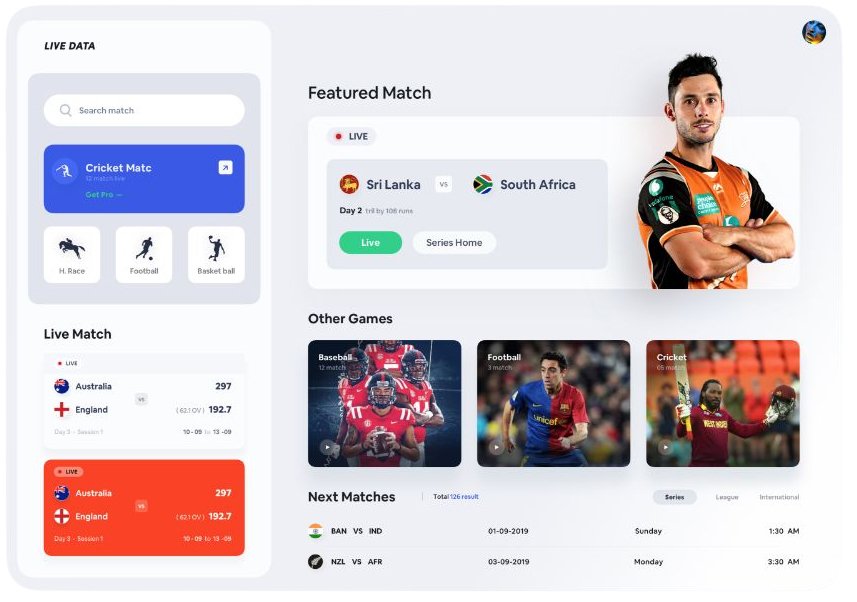
View key operational summaries, active user counts, available sports, upcoming events and relevant system activity in one place. Dashboard widgets can be configured according to an administrator's role.

User & Account Management

Manage user profiles, account status, access permissions and support-related records. Authorized staff can review account activity and maintain organized user information.

Sports & Match Management

Organize sports categories, tournaments, fixtures and match schedules. Where supported, administrators can review event status and manage relevant match information through the dashboard.

Reports & Analytics

Review operational reports, user activity, transaction summaries and platform usage trends. Reporting tools help administrators understand activity and make informed operational decisions.

Role-Based Access & Security

Configure administrator roles, access permissions and authentication requirements. Audit logs can help track important administrative actions and support accountability.

Transaction & Financial Records

Where legally permitted and supported, manage transaction records, review payment statuses, reconcile financial activity and maintain records for authorized financial operations.

Notifications & Support Management

Organize platform announcements, system notifications and customer support requests. Keep communication workflows structured for the authorized support team.

Platform Configuration

Manage supported application settings, sports categories, administrative preferences and integrations through a centralized configuration interface.
Frequently Asked Questions About Gaming Admin Panels

A Gaming Admin Panel is a centralized backend interface used to manage users, sports information, platform settings, reports and other authorized administrative functions.

It provides an organized way to oversee supported platform operations, manage administrative access, review activity and maintain operational records.

Depending on its configuration, a multi-sport platform may support cricket, football, tennis, basketball, kabaddi, badminton, volleyball and other sports.

Yes, a multi-sport system can provide a shared dashboard for supported cricket and football modules, with separate event data and sport-specific settings.

Common features include dashboard analytics, user management, match and event management, role-based permissions, reports, notifications, platform configuration and supported transaction records.

No. Live scores, fixtures and other sports information depend on the selected data provider, integrations, licensing and the panel's available features.

This website is strictly for users aged 18+. Online sports trading involves financial risk and can be addictive. We provide secure Online Cricket IDs, casino IDs and betting accounts for all major sports, but all participation is at your own risk. We are not responsible for any financial losses or legal issues. Our services are not available in Indian states where online gaming is prohibited by law. Please play responsibly.